
Church chart of accounts: free template and how to set it up
Copy a free church chart of accounts sample, learn the account vs fund rule, and set up your own list in five simple steps.
A church chart of accounts is the list of the accounts your church has that you record your church's money in. This page has a sample of our chart of accounts you can copy, the single line test for the account or fund question, and how to adapt the sample to your church.
Church chart of accounts sample
|
Number |
Account |
Type |
What to put in it |
| Number
1010 |
Account
Cash in hand |
Type
Asset |
What to put in it
Sunday cash prior to hitting the bank. |
| Number
1020 |
Account
Bank account |
Type
Asset |
What to put in it
Deposits and disbursements from your main account |
| Number
1030 |
Account
Savings or reserve |
Type
Asset |
What to put in it
Money provided by an organization in the event of a breakdown, for example a repair reserve. |
| Number
1100 |
Account
Land and building |
Type
Asset |
What to put in it
Church property, at cost |
| Number
2010 |
Account
Bills payable |
Type
Liability |
What to put in it
Received invoices but not paid |
| Number
2020 |
Account
Loans payable |
Type
Liability |
What to put in it
Building loan or any money borrowed |
| Number
3010 |
Account
General net assets |
Type
Net assets |
What to put in it
Money a church can use for any reason. |
| Number
3020 |
Account
Restricted net assets |
Type
Net assets |
What to put in it
Money given for a specific reason and not used yet |
| Number
4010 |
Account
Tithes |
Type
Income |
What to put in it
Tithes from members |
| Number
4020 |
Account
Sunday offerings |
Type
Income |
What to put in it
Regular weekly offerings |
| Number
4030 |
Account
Thanksgiving and special offerings Income |
Type
Income |
What to put in it
Thanksgiving, first fruit and other special collections |
| Number
4040 |
Account
Contributions to the Building |
Type
Income |
What to put in it
Giving to the building project |
| Number
4050 |
Account
Mission gifts |
Type
Income |
What to put in it
Gifts for missions |
| Number
5010 |
Account
Pastor and staff support |
Type
Expense |
What to put in it
Salaries and allowances |
| Number
5020 |
Account
Ministry Programs |
Type
Expense |
What to put in it
Cost Children, Youth, Women, Sunday School |
| Number
5030 |
Account
Building repairs and maintenance |
Type
Expense |
What to put in it
Repairs, painting, and cleaning products. |
| Number
5040 |
Account
Utilities |
Type
Expense |
What to put in it
Electricity, water and internet |
| Number
5050 |
Account
outreach and missions |
Type
Expense |
What to put in it
Missions trips, missionary support and local outreach |
| Number
5060 |
Account
Administration |
Type
Expense |
What to put in it
Printing, stationery and bank charges |
Familiar numbering system Assets are 1's, liabilities are 2's, net assets are 3's, income are 4's and expenses are 5's. Leave gaps between numbers so you can add accounts later without renumbering.
Download the free PDF and get a longer chart (50+ accounts) as well as a list of funds.
Launch your church into the future
Everything your ministry needs — giving, events, members, and more. Try it free, no credit card required.
Start Free Trial No credit card • Cancel anytimeAccount or fund? How to receive special offerings
An account defines the type of money. A fund defines the purpose of the money. A building gift is income (the account) that you allocate to the building fund (a fund).
If you report it by kind, like income or expense, it is an account. If you report it by purpose, like building or missions, it is a fund.
How you record it depends on your tools:
-
Spreadsheet or simple software: Set up a different income account for each category of money, such as "Building gifts" and "Mission gifts".
-
Software: have one income account and assign a fund to each record. You don't have a long list of close duplicate accounts.
If you want more information, check out our guide to church fund accounting.
How to set up a church chart of accounts
Rewritten starting from the sample text above.
-
Delete what you don't have. You don't have a loan? Remove 2020. You don't have a building project? Remove 4040.
-
If the church is calling it first fruit offering, leave that.
-
Include what is lacking. The second bank account or the vehicle would each need a new account.
-
Choose how special gifts are handled. Use different accounts or fund tags - see above.
-
Add opening balances. Enter the balances on your start date and make some test transactions (have a play) before you go live.
Manage the number of accounts well rather than trying to include the entire world of receipts. Monitor the chart and when your reporting requirements are required, add the appropriate accounts.
Common chart of accounts mistakes
-
Consolidate all "Offerings" accounts. You may want to track tithes, general offerings and special offerings separately, based on your reporting requirements.
-
Create a separate account for each donor. Your giving records will already contain the names of each of your donors. Use these records rather than setting up an income account for each person.
-
Numerous small expense accounts. Consolidate multiple small expenses into larger ones - for example, consolidate them together into administration.
-
Redness an account in the middle of the year without a note. Record the change so you will be able to compare reports and understand the variances.
-
Leave an account inactive and don’t delete it to keep historical transactions for it.
When should you update your chart of accounts?
Change it when there's a new ministry, a new bank account, a building project, or when the church takes out a loan. Change it at the beginning of your financial year so that a whole year of reports uses the one structure. It's a great opportunity to review your church budget.
How this works in Tabernacle
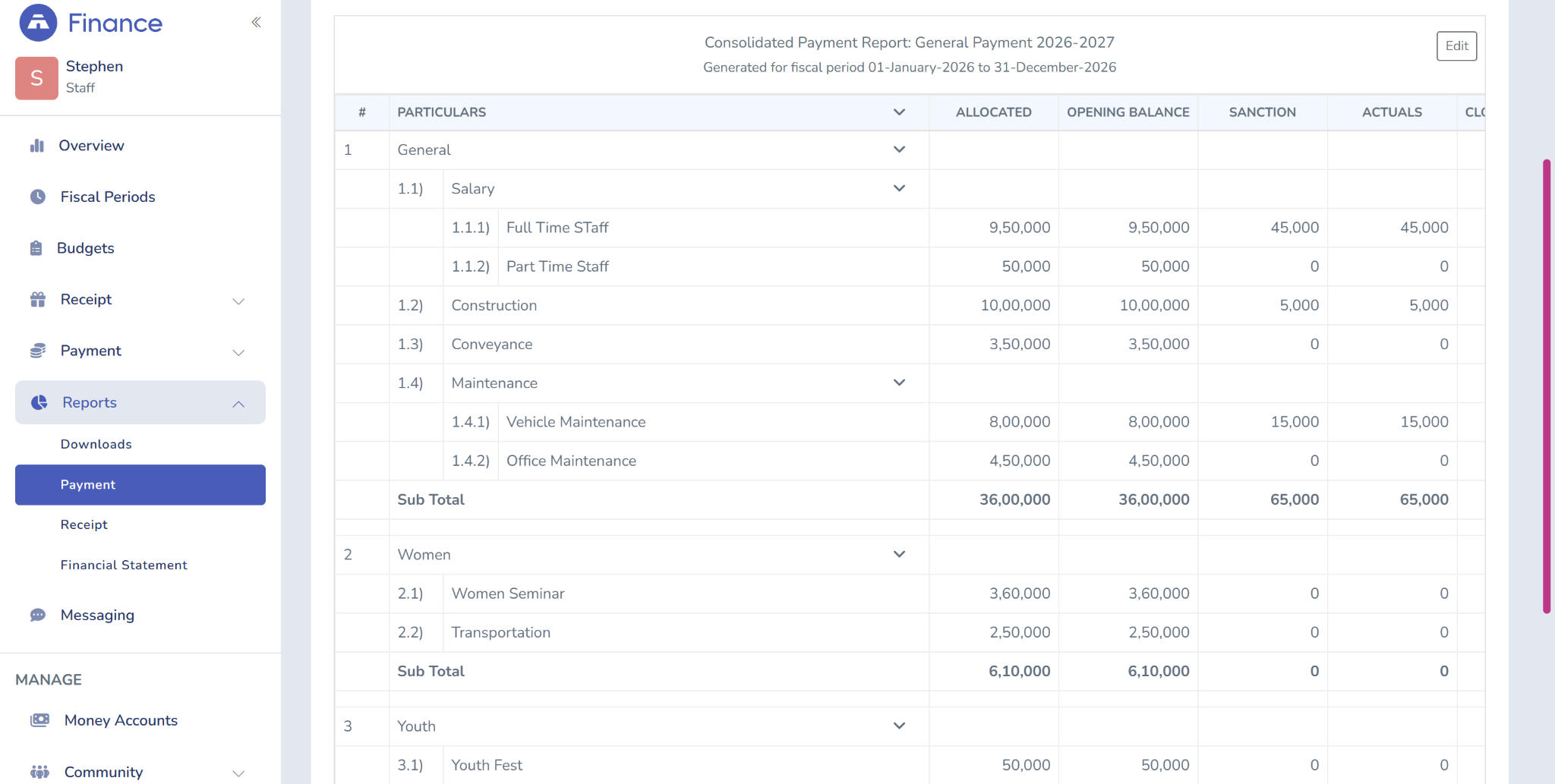
In Tabernacle a church develops its budget from top heads and sub heads which it assigns a name to eg General, then Salary, then Full Time Staff. The Finance module also has payment ledger reports and financial statements.
Tabernacle handles the fund accounting for tithes, offerings, special collections and building funds, so a building gift can remain linked to the building fund. See how it integrates with church accounting software and the all-in-one church management software Tabernacle provides.
Frequently Asked Question
Are account numbers necessary?
While account numbers aren't necessary, they do help in organising, identifying and sorting accounts. Create a logical numbering system with room for future accounts. Danielson Bookkeeping & Consulting
How frequently does a church need to review its chart of accounts?
Review it at least yearly or when your church has new requirements for financial reporting. Eliminate unused accounts and add new ones as needed.
Can a church have a single chart of accounts from year to year?
Yes. Sticking with the same format of a chart for different years of a financial statement makes it easier to compare them. Changes should be made sparingly and recorded in the notes.
Church Event Planning Checklist (Free Template)
A simple 8-step church event planning checklist where every task has an owner and a deadline. Download the free templat…

Church website: 8 must-have features
What every church website needs, from service times to sermons and forms, with real examples from church websites we ha…

Church games: 15 easy ideas for every group
15 easy church games for kids, youth, small groups and adults. Most need only things you already have at home.
